

A Car Model and a New Texturing Workflow
After trying 3ds Max, ZBrush and Photoshop, I'm keeping Blender for modeling and adopting Substance Painter for textures. Here is a car to show the result.
I wasn’t fully satisfied with my Blender-then-Paint.NET workflow, so I recently tried a lot of graphics software: 3ds Max, ZBrush, Photoshop and, most importantly, Substance Painter, which I’m not going to give up. My feelings about ZBrush and 3ds Max are mixed, and I’ll stick with Blender for now. ZBrush doesn’t let me build low-poly meshes efficiently. As for 3ds Max, I don’t like its UV mapping tools, and none of the modeling tools Blender lacks turned out to be that useful to me.
So my plan is to keep modeling and unwrapping low-poly meshes in Blender, then import them into Substance Painter to generate the textures, normal maps included. Baking a high-poly model (sculpting a detailed version and projecting its surface detail onto the low-poly mesh as a normal map) can give great results, but it takes too much time and isn’t that easy to pull off when you’re a developer rather than an artist. Painting the normals directly in Substance Painter is a good compromise.
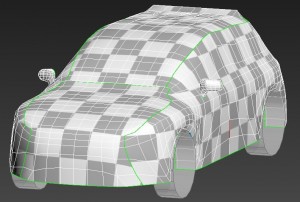
Here is a car I modeled in 3ds Max:
And here is the result once painted in Substance Painter:
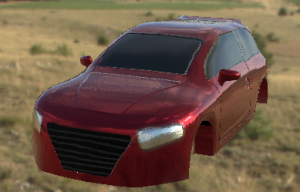
The windows aren’t perfectly straight. A drawing tablet and a bit more patience would have helped, but the potential is clearly there.
To push this workflow further and add more detail, I might paint only a mask and the overall normal map in Substance Painter, then bring them into Substance Designer to apply the materials.