

Boats: Designing a Factory and Tower Defense Game on Hexagonal Sea Stations
A Unity strategy prototype: sail a boat, harvest islands, grow hexagonal floating stations and prepare them for endless enemy waves. The design, and the code that exists so far.
Since last summer I have been working, on and off, on a desktop strategy game in Unity that I simply call Boats. The README sums it up in one line: control a boat, harvest resources on islands, build a network of stations and prepare it for a siege. It mixes two genres I enjoy, factory building and tower defense, and puts both at sea.
The code is on GitHub: florian-noirbent/Boats.
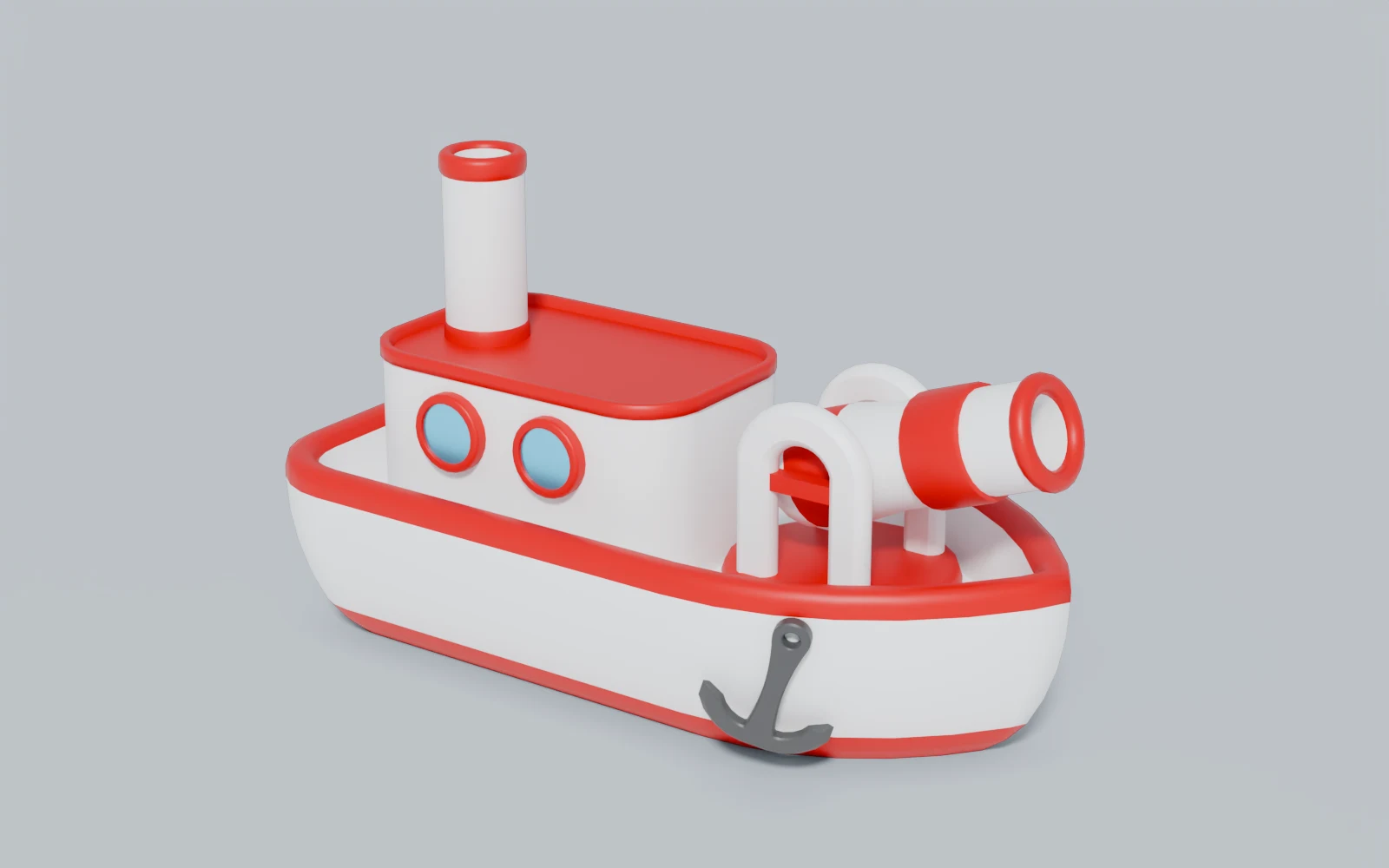
The player boat, rendered from the game’s PlayerBoat.blend model with its painted vertex colors and in-game material colors.
This article covers both halves of the project: the game I designed, which lives in a game design document, and the game that actually runs, which is a much smaller vertical slice of it. I think the gap between the two is the most useful part to talk about.
The concept
The design document starts with a short concept overview:
- Character: the player, their bases, their ships.
- Control: you drive one main boat directly. Everything else is a station network you influence when you are close to it (“proximity control”).
- Camera: fixed on the player’s boat.
- Map: boats and islands, procedurally generated, fixed size.
- Win and lose: there is no win. It is survival against infinite enemy waves, and you lose when your boat is destroyed and no station is left to respawn it.
So the shape is: early on, you are a single boat collecting resources by hand. You found stations, floating bases of hexagonal platforms, and grow them into small factories that harvest, refine and ship resources to each other. Enemy combat boats spawn from the edge of the map, and the station network has to be ready for them, with defense towers and construction towers that repair the base under fire.
The sea is what makes the setting more than a skin. Your bases are platforms on open water, so where you can build is decided by the navigation mesh, not by a terrain grid. Logistics between bases are not conveyor belts across the map but cargo ships that sail from port to port, and ships are also what attacks you. Islands are the resource deposits, plus one resource that is harvested from the water itself.
The game design document
The repository has a Documentation folder with a 28-page game design document and an architecture document (both also linked from the README as Google Docs). The design is surprisingly complete for a solo prototype, so here is the core of it.
Stations and buildings
A station is “a group of connected hexagonal platforms composed of a command center and different buildings linked to it via conveyor buses”. The numbers for the first version: at most 2 stations, at least 100 m between stations, and resources at least 40 m away.
Every platform is a building:
- Command center: the first platform of any station, with the station’s storage. It can be upgraded to T2 and T3, and each tier increases how far (in hexagons) the station may extend from it.
- Drone bay: sends harvester drones to a selected resource in a 120° cone, 30 to 100 m away, and rebuilds lost drones automatically.
- Port: sends a selected material to another station by cargo ship.
- Laboratory: spends station resources on research, shared by all labs.
- Warehouse: adds storage containers.
- Factory: turns raw materials into intermediate items.
- Conveyor bus: links buildings back to the command center. Every building must be connected.
- Construction tower: builds and repairs the station and friendly units nearby, prioritizing repairs.
- Defense tower: attacks enemy ships within 75 m.
The rule I like most is the proximity bonus. Every building lists the bonuses it receives from each neighbouring building type. A warehouse next to a factory gives -20% item cost, a command center next to a factory +20% build speed, but a defense tower next to it -20%. Two defense towers side by side get +25 attack range each. With hexagons each platform has six neighbours, so the layout of a station becomes a small puzzle, a bit like adjacency bonuses in city builders. The document even sketches build layouts on the hex ring around some buildings: the drone bay keeps the three cells on its harvesting side free, the port only the cell in front of its dock.
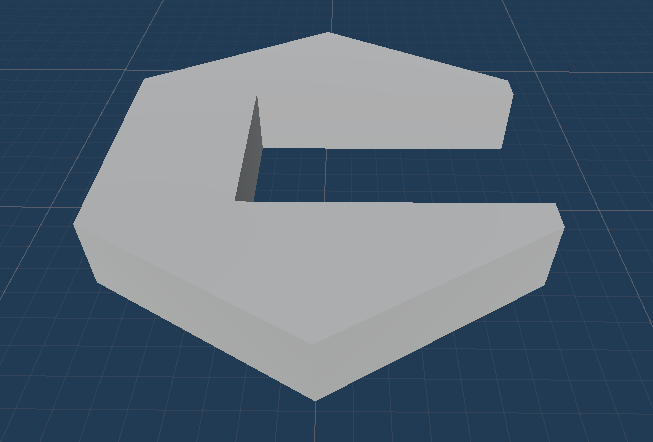
The port placeholder: a hexagonal platform with a dock cut into one side, where cargo ships will berth.
Resources and production
Production is deliberately short. There are three raw materials:
- R1, a common island resource,
- R2, a rarer island resource,
- R3, harvested from the water.
Factories turn R1 and R2 into three intermediate items (I1, I2, I3) used for research, and turn R3 into energy, which every active building spends: a drone bay pays 10 energy per drone sent, a defense tower 10 per shot, a port one energy per 5 m its cargo ship travels. Each resource node also has a regeneration rate, so a deposit is a flow to balance rather than a stock to exhaust. The names are placeholders on purpose; the tables literally have “TODO” in their name and icon columns.
Storage is counted in containers: a container holds 250 units of a single resource type. The player boat has 2, a cargo ship 4, a warehouse 4. That one rule makes every inventory a small packing problem, and it is what the code implements most completely (more below).
Logistics between stations
This is the part closest to a factory game. Each station can mark every material with one of six states:
- active requester (receives from passive and active providers),
- passive requester (receives from active providers),
- neutral,
- passive provider (sends to active requesters),
- active provider (sends to active and passive requesters),
- stop production or harvest.
Cargo ships are then sent automatically wherever a provider matches a requester, and ships already on their way count toward the thresholds so a station is not flooded. Anyone who has played Factorio will recognize the idea of its logistic network, with active and passive provider chests and requester chests, applied here to whole bases connected by boats instead of chests connected by robots.
Ships, enemies and research
Four kinds of ships are specified: the player boat (harvest, haul, build and fight), cargo ships built by ports, harvester drones built by drone bays, and the enemy combat boat, which spawns from the map edge and attacks. The enemy section stops at “TODO define AI rules”, and the combat chapter is empty. The research list is written but not yet arranged into a tree: unlocks for the port and the two towers, T2 and T3 command centers, +1 max station, ship speed and regeneration, and so on.
The interface
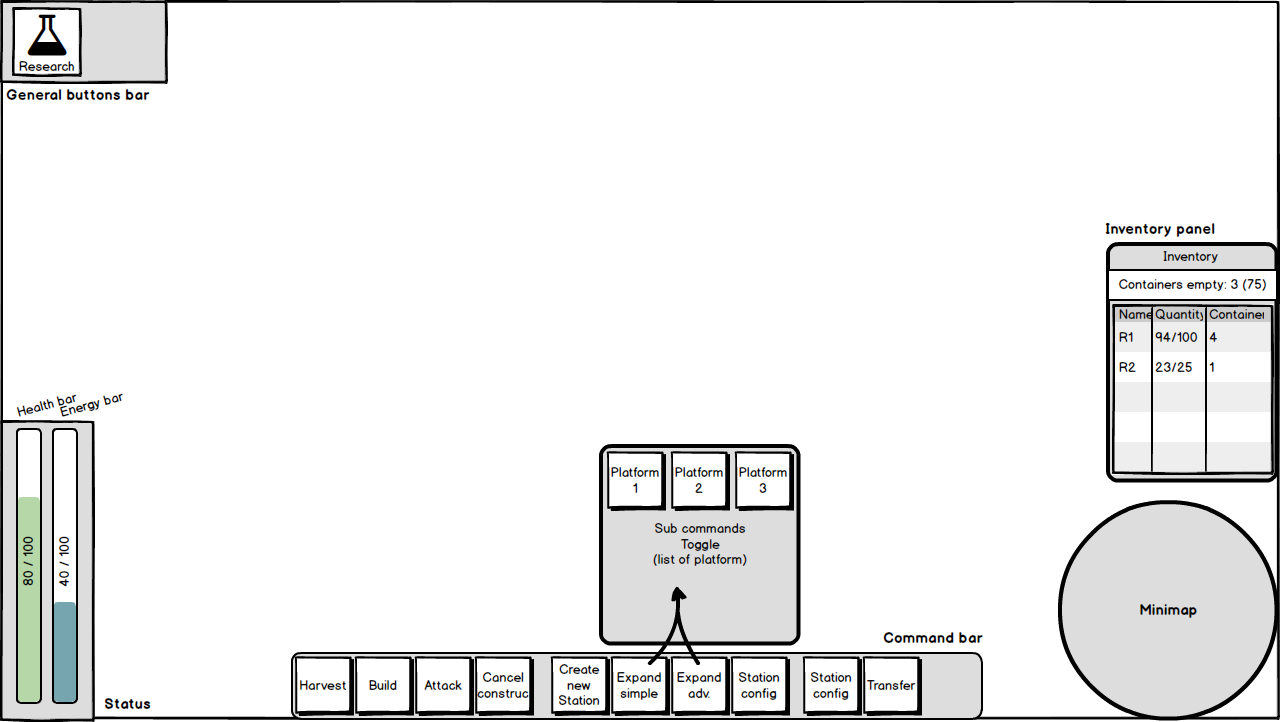
The HUD mockup shows the control scheme. Most actions go through a command bar whose buttons depend on what is near the boat: harvest the closest resource, build or cancel the closest blueprint, attack the closest enemy, create a new station, expand the current one (with a sub-panel listing the platform types), configure the station, or open the transfer panel. Health and energy bars sit on the left, the inventory and a rotating minimap on the right.
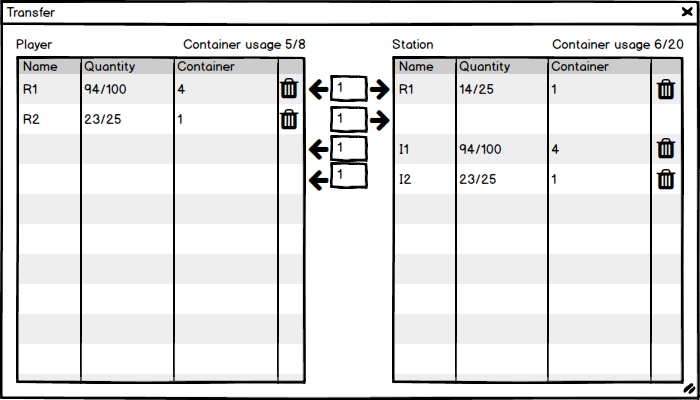
What actually runs
The repository has 22 commits from July 28, 2018 to March 3, 2019, with long pauses in between. What you can do in the test scene today:
- click to sail the boat, which uses Unity’s NavMesh to path around islands and platforms;
- right-click a resource to harvest it into the boat’s containers, while the resource slowly regenerates;
- place a new station blueprint on open water, at least 100 m from any other station;
- sail to a blueprint and right-click it to deliver the materials it needs, after which it turns into a real platform;
- expand a station platform by platform on its hexagonal grid, rotating the new platform with the mouse wheel;
- open the transfer panel to move resources between the boat and a station inventory.
There are no enemies, waves, towers that shoot, factories that produce, drones or cargo ships yet. The nine building types exist as data and placeholder prefabs, but they are platforms without behavior. In other words, the “factory” and “tower defense” halves are both still on paper. What exists is the foundation they need: building, inventories, the station grid and the UI architecture.
The timeline shows where the effort went. Inventory and harvesting came first (August 2018). Blueprints and the builder action, along with an upgrade to Unity 2018.3 and C# 7.1, landed in October. December was the station month: the command UI, Unity’s NavMesh components, a Cinemachine camera, the station manager with its minimum distance, the expander tool and the hexagonal station grid. January added building types and platform rotation, and February was spent on the UI and on architecture. The last commit, “Game rescale, models integration”, replaces some placeholders with Blender models: the player boat, a cargo boat, the command center, the platform and port platform, a research facility, a warehouse, a rock and a palm tree.
Interesting parts of the code
A hexagonal grid per station
Each station owns a small hex grid. Coordinates use the cube coordinate system from Red Blob Games’ guide to hexagonal grids, which the CubeCoord struct references directly. A hexagon is stored as (Q, R) with an implicit third axis S = -Q - R, and converting a world position back to a tile is a single rounding operation. Platforms do not store their coordinates at all: they compute them in Awake from their local position and their rotation, so a platform placed by hand in the editor and one built in game behave the same.
This is my third hexagonal grid. Hexa in 2014 was a 2D C++ engine, and the Hex Tile Engine was a Unity terrain painter. Boats does not reuse that engine, which solves a different problem (painting 3D terrain), but it does apply its main lesson: start from cube coordinates and let the math do the rounding.
The interesting rule is where you are allowed to expand. A free cell is a valid slot if it touches at least one platform, except when that platform is a port whose entrance faces the cell:
if (_grid[neighbor].Type == HexaType.Port &&
    neighbor + _grid[neighbor].Direction == coord)
{
    isLockedHexa = true; // never build in front of a port's dock
    break;
}
foundLink = true;
The same rule applies the other way when you place a port: the expander checks that the cell in front of the rotated dock is still free, and refuses the placement otherwise. That is the whole reason platforms have a direction, and the HexaType enum (full, port, half) is already there for the drone bay’s half-platform shape.
Building with the boat
Harvesting and building share one abstraction, BoatAction: a component with a frequency, a range and a quantity per tick. TryExecute is called every frame while the boat has a target, and only acts when the target is in range and the cooldown has passed:
if (Vector3.Distance(transform.position, target.transform.position) < _range &&
    _lastExecute + _actionFrequency * target.ActionFrequencyMultiplier < Time.timeSinceLevelLoad)
The target can slow the action down: a rare resource has a frequency multiplier, which is how “R2 harvests at half speed” from the design document becomes one field. The Builder takes whatever the blueprint is missing from the boat’s inventory, up to its quantity per tick, and when nothing is missing the blueprint spawns the real structure and asks the NavMeshSurface to rebuild, so the boat immediately has to sail around its new platform. A line renderer, driven by an event on the action, draws the harvest or build beam.
Containers, not weights
The Inventory implements the container rule with two numbers, a segment count and a segment size (2 containers of 250 for the boat):
public int UsedSegment => _items.Values.Sum(x => 1 + x.Quantity / _segmentSize);Each resource type uses at least one container, and the free space for a type is the empty containers plus what is left in its last partial one. It is a tiny piece of code, but it gives the boat exactly the trade-off the design wants: carrying a little of many resources wastes space.
Data-driven buildings
Buildings and items are ScriptableObject assets. A StructureTypeObject holds the name, icon, tooltips, hexagon shape, the platform prefab, the blueprint prefab, the construction cost, and whether it is locked or buildable. The expand sub-menu is generated from the list of these assets, and the costs match the design document (500 R1 for a command center, 1500 R1 and 500 R2 for a port). Adding a building type is a new asset, not new code, at least until it needs behavior.
Controllers and an MVVM interface
Input is handled by a small controller stack: a ControllerManager runs one IController per frame, by default the boat controls. Placing a new station or expanding one “claims control”, which swaps the left and right mouse buttons to mean place and cancel, and gives focus back when done. It keeps the modes from fighting over the same clicks.
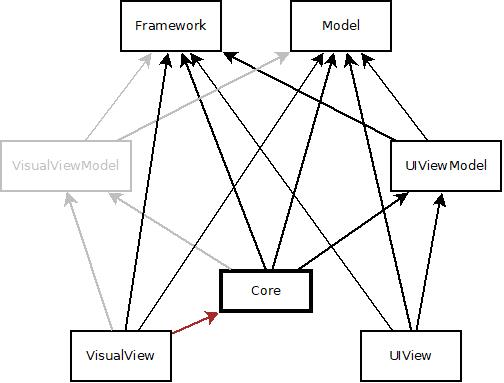
The February work split the scripts into six assembly definitions: Framework, Model, UiViewModel, UiView, Visual and Core. The point is the arrows that do not exist. UiView references only the view models, the model and the framework, never Core, so the interface cannot reach into game logic. Core objects expose themselves through observable view models (INotifyPropertyChanged, observable collections and dictionaries written for the project), registered in a CoreContainerViewModel that acts as a small dependency injection container. A selectable object near the boat pushes its CommandViewModels to the command bar, and the view just reacts. It is the MVVM pattern from WPF applied to Unity UI, and it makes building the transfer panel or the tooltips mostly a matter of binding.
What’s next
The foundations are in place, and the next steps follow the design document: replacing the remaining placeholders with the new models, making the buildings work (drone bays first, then factories and energy), cargo ships and the logistics rules, and then the reason the stations exist at all: enemy waves, defense towers and construction towers. The combat chapter and the enemy AI are the parts of the design I still have to write.
Links
- Source code: florian-noirbent/Boats
- Red Blob Games: Hexagonal Grids
- Factorio wiki: Logistic network
- Unity: NavMesh components
- My earlier hexagonal grids: Hexa and the Hex Tile Engine